Desktop Forums Blog Support Patreon
Official Steam Group | Patreon Chat
jack1974
https://pbs.twimg.com/media/C6fXjg6XMAA6409.jpg" style="max-width:100%">

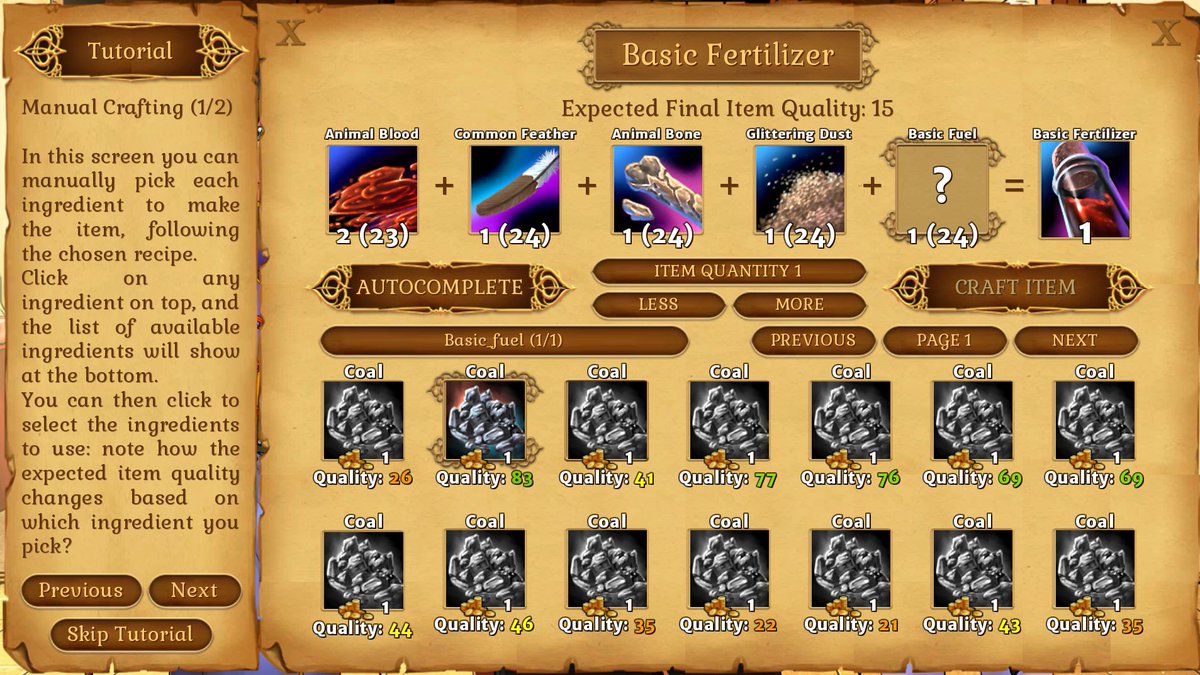
Doing the tutorial for the manual crafting screen! Lol this is a classic of gamedev, working hours for something that maybe only 1% of players will use :lol:

In practice you can pick each ingredient to use, but (luckily!!) there are auto-crafting buttons, with possibility to choose highest / lowest quality targets, and the AI will do the task.

This screen will be used only by those "hardcore players" who wants to manually add the ingredients, for example to save some money if the task will require a specific target quality.

Because if you pick high quality autocrafting, you could risk to craft for example a batch of fertilizer quality 90, when maybe the task/order you got was to craft 5 fertilizer >50 quality. So the (fool) hardcore player would go in this screen and manually pick the ingredients to fullfil the order but not waste the most precious ones :mrgreen:
Troyen
https://pbs.twimg.com/media/C6eH2YiWMAAdESR.jpg" style="max-width:100%">

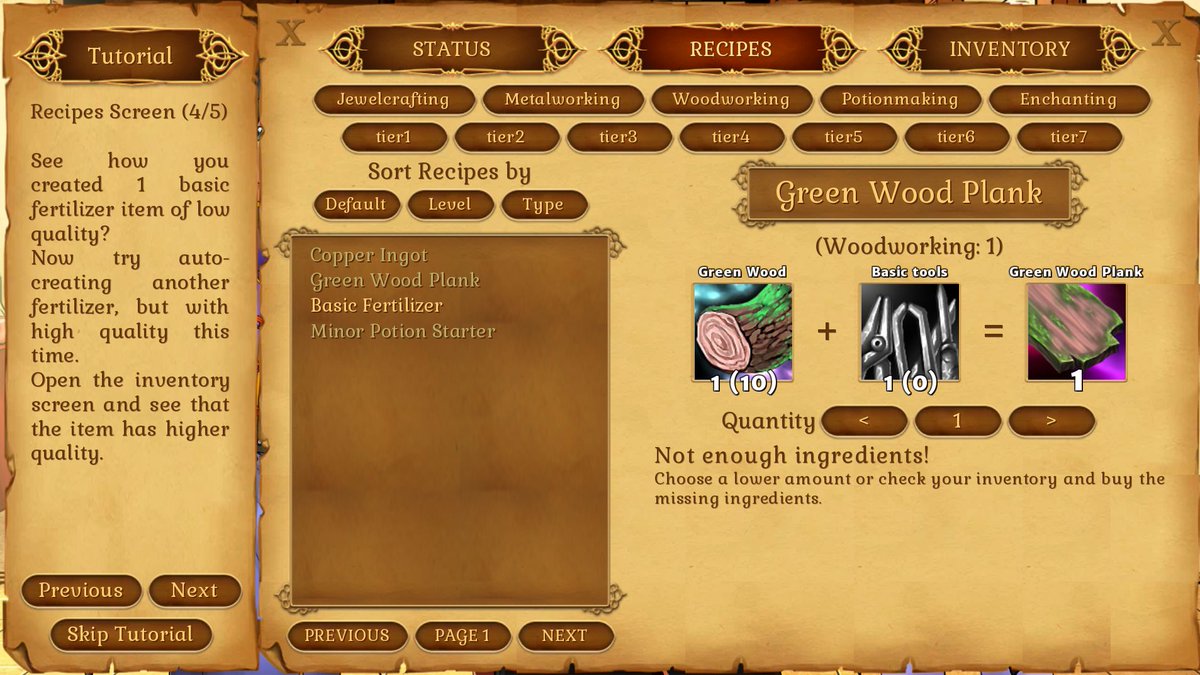
this is also the moment where the crafting framework will be put to "full test". I mean, I made 250 recipes :lol: and it was working but the crafting framework is much more complex than it looks to the players, so there are several minor features that hopefully I'm going to add with Anima's help during this month.

As I said I don't want to make anything overcomplex but there are still a few missing "key" features that I want to add :) For example in the screenshot above, now I display the quantity of the ingredients, so you know what you're missing! Before it would just say "you're missing stuff!" but without being able to know WHAT, unless you looked in the inventory... not really good :mrgreen:

How would this look with the 0 in red? Seems like you greyed out the tools icon, but can still be a little hard to notice the (0) at first glance.
jack1974
Yup I can also do that :)
Palmettogamer14
Holy smokes! I'm so looking forward to this game!
jack1974
Thanks. I think next week or so I might start preorders, since by then the story part should be ready, and I'm sure the game will be out a way or another :lol:

https://pbs.twimg.com/media/C6isEwAU0AA9eAv.jpg" style="max-width:100%">

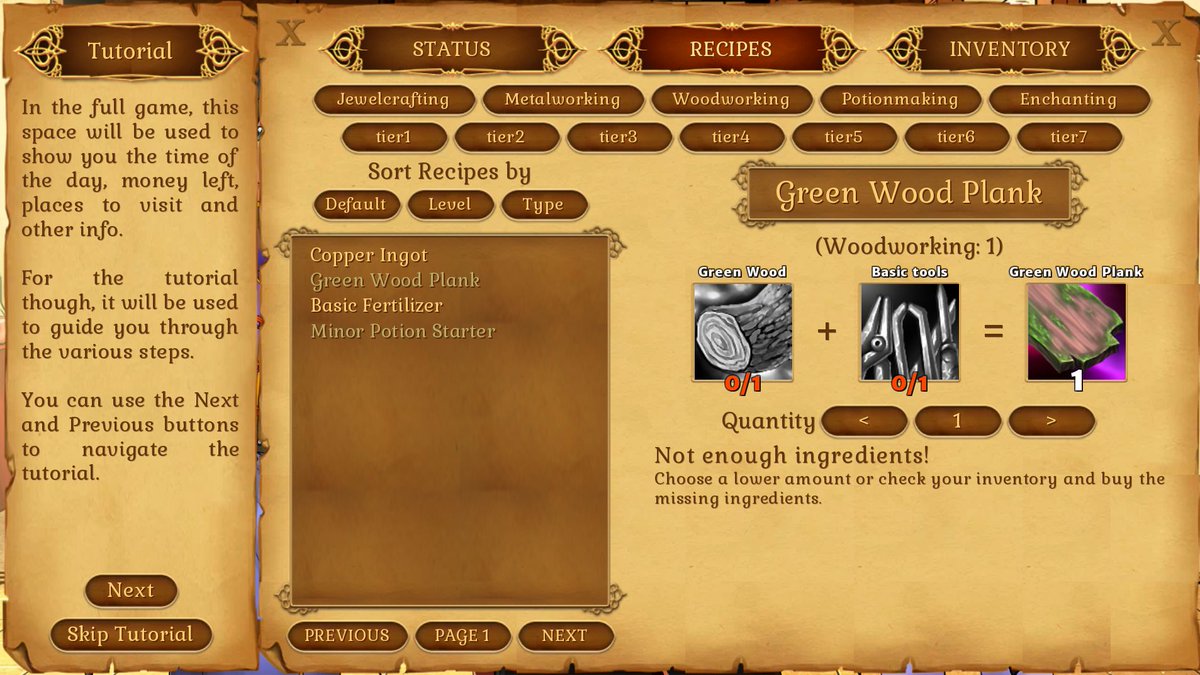
After talking with Aleema I changed it so that uses the more common format youhave/youneed, which is used in many crafting games. Also, in the example screenshot above, I also highlight in red the items you're missing (beside grayscaling the item itself). I think now should be OK!
jack1974
https://pbs.twimg.com/media/C6jGNoWU0AAEx1V.jpg" style="max-width:100%">

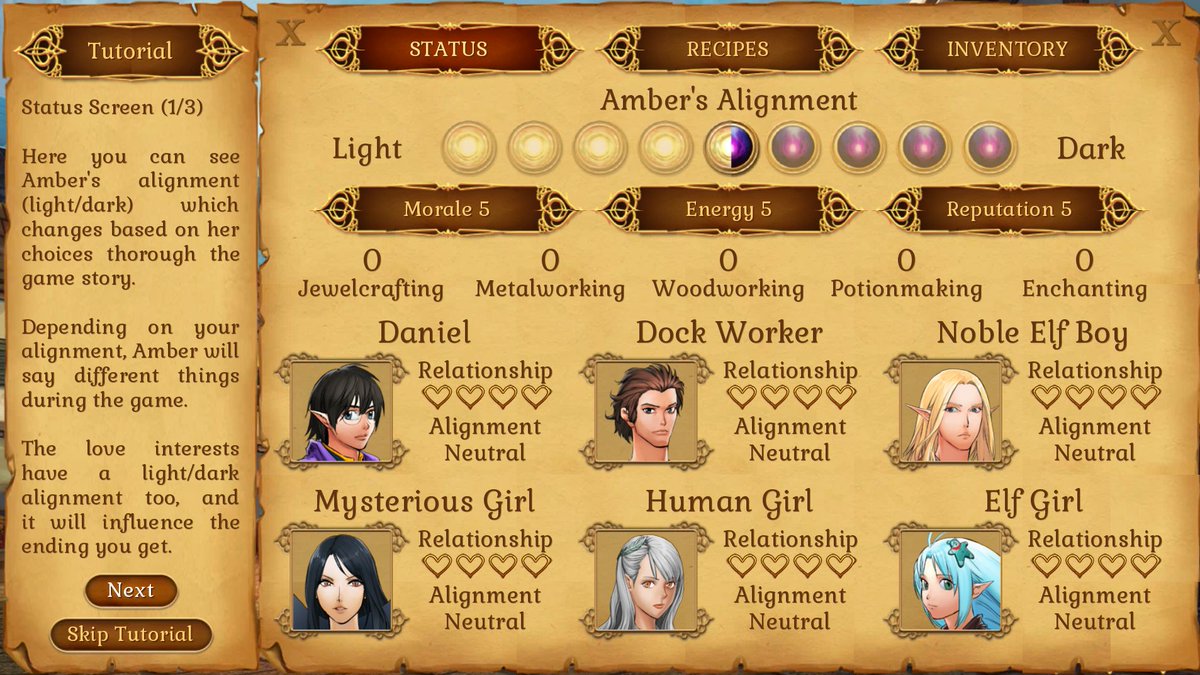
Finished the "status screen" tutorial as well! Now I have to start adding all the various activities, random events, etc and link all the various characters scenes into the game. I'll probably devote the next week to this, hopefully next Friday will be at a good point.


I thought to copy paste the tutorial texts here since I wrote those myself, in case someone wants to fix/edit them (in some cases I was forced to shorten some sentences to have the texts fit the small tutorial window!):
[code] TutorialText=["","In the full game, this space will be used to show you the time of the day, money left, places to visit and other info.\n\nFor the tutorial though, it will be used to guide you through the various steps.\n\nYou can use the Next and Previous buttons to navigate the tutorial.",
"On top of the screen you see three buttons: status, recipes and inventory.\n\nStatus: see various stats about Amber\nRecipes: main crafting screen\nInventory: items Amber owns\n\nWe're going to focus on the crafting part for now: we'll review the status screen later.",
"Recipes Screen (1/5)\n\nIn this screen you can both review the known recipes, but also craft the items directly.\n\nThe buttons on top lets you filter the recipes based on the skill required (Jewelcrafting, Metalworking, etc) or on the item level (tier1, tier2, etc).\n\nYou can also sort the recipes list.",
"Recipes Screen (2/5)\n\nThe recipes list on the left has greyed out names: means you know that recipe but don't have enough ingredients for it.\n\n[Click] Basic Fertilizer recipe now and you'll see a list of ingredients: first number is how many you have, second is the amount required. Of course changing the quantity changes the required amount.",
"Recipes Screen (3/5)\n\nAutomatic crafting low quality will craft the item auto-picking the lowest quality ingredients, while high quality will do the opposite.\n\nManual crafting will instead open the crafting screen, where you can craft the item as you want.\n\nTry [click]ing on Automatic Low Quality now.",
"Recipes Screen (4/5)\n\nSee how you created 1 basic fertilizer item of low quality?\n\nNow try auto-creating another fertilizer, but with high quality this time.\nThis system will always try to craft the required item(s) amount with the available ingredients.\n\nLet's see manual crafting now!",
"Recipes Screen (5/5)\n\nOnce again [click] in the recipes list the Basic Fertilizer but this time [click] on Manual to craft the item manually.\n\nNote: most of the time you'll use automatic crafting, manual will be only required for specific tasks where a target quality is set, and you don't want to waste precious ingredients.",
"Manual Crafting (1/2)\n\nIn this screen you can manually pick each ingredient to use, following the chosen recipe.\n[Click] on any ingredient on the recipe on top, and the list of available ingredients will show at the bottom.\nYou can then [click] to select the ingredients to use: note how the expected item quality changes based on what you pick?",
"Manual Crafting (2/3)\n\nThis because each ingredient in a recipe has an impact in the final item quality.\nIn some recipes, certain ingredients matters more than others. The only way to find out is to experiment with manual crafting!\nLastly, let's see how to fill correctly the recipe to craft the final item.",
"Manual Crafting (3/3)\n\nThe icons on top are greyed out until you choose the required quantity: for example for this recipe you need 2 animal blood. After you choose 2 from the list below, that icon will become colored.\nRepeat this step for all the ingredients, or use autocomplete to automatically finish the recipe then [click] on Craft Item.",
"End Of Tutorial\n\nYou now know all you need to craft items using ingredients!\n\nYou start only with a few recipes and items, but soon you'll learn how to gather ingredients or buy them, and how to get new recipes.\n\nPlease [click] End Tutorial button at the bottom to exit the tutorial.",
"",
"",
"Status Screen (1/3)\n\nHere you can see Amber's alignment (light/dark) which changes based on her choices thorough the game story.\n\nDepending on your alignment, Amber will say different things during the game.\n\nThe love interests have a light/dark alignment too, and it will influence the ending you get.",
"Status Screen (2/3)\n\nMorale and Energy are important to do some activities and influence crafting. Reputation will be important later in the game to acquire new items or recipes.\n\nBelow there are the various Amber skills levels (Jewelcrafting, Metalworking, etc).\nEach recipe has indeed a minimum skill requirement to be used.",
"Status Screen (3/3)\n\nLastly you can see the relationship and alignment of each love interest.\nThe relationship will increase as you talk with them and later in the game go out on dates.\nAlignment will change based on the game's choices, and will be like Amber light or dark.\n\nThat's all you need to know!",
][/code]
Jaeger
The instructions seem pretty clear, from skimming through the text.
jack1974
Cool, thanks for checking :)
BobTheMob
"Manual Crafting (2/3)\n\nThis because each ingredient in a recipe has an impact in the final item quality.\nIn some recipes, certain ingredients matters (should be matter) more than others. The only way to find out is to experiment with manual crafting!\nLastly, let's see how to fill correctly the recipe to craft the final item.",

"Status Screen (2/3)\n\nMorale and Energy are important to do some activities and influence crafting. Reputation will be important later in the game to acquire new items or recipes.\n\nBelow there are the various Amber (shouldn't be there) skills levels (Jewelcrafting, Metalworking, etc).\nEach recipe has indeed a minimum skill requirement to be used.",


Those are the only things I could see as needing to be fixed. :)


Also, qs.: the various love interests--do their alignments change w/ Amber interacting w/ them? Or vice versa? And do their alignments alone affect the endings or does Amber's also play a role in such?
Troyen
"Recipes Screen (1/5)\n\nOn this screen you can review the known recipes and craft items.\n\nThe buttons on top let you filter the recipes based on the skill required (Jewelcrafting, Metalworking, etc) or on the item level (tier1, tier2, etc).\n\nYou can also sort the recipe list.",


Are you going to capitalize the tiers? Tier 1, Tier 2, etc.?


"Recipes Screen (2/5)\n\nIf a recipe on the list to the left is greyed out, you know that recipe but don't have enough ingredients for it.\n\n[Click] The Basic Fertilizer recipe now and you'll see a list of ingredients: the first number is how many you have, the second is the amount required. Of course changing the quantity changes the required amount.",

You said you had to trim some words to fit on the screen. If this is too long, trim the "the"s I added in the second sentence. (But I cut words from the first, so maybe it fits?)


"Recipes Screen (3/5)\n\nAutomatic crafting low quality" looks like a name, but I'd need to see what it refers to in order to offer an editing suggestion. The parts of speech don't match.


(Recipes Screen 4/5) "This system will always try to craft the required item(s) amount with the available ingredients" - I don't follow what you mean by "required item(s) amount)" here. Is this the recipe item? Or is it talking about a quality requirement? Depending on which, you may not even need this sentence.


"Recipes Screen (5/5)\n\nOnce again [click] Basic Fertilizer in the recipes list, but this time [click] on Manual to craft the item manually.


Manual Crafting (1/2)" - you mean (1/3)? ;) (You can also delete the comma before "following")

[Click] on any ingredient in the recipe on top

use. Notice how the expected item... (Also note the : -> . change!)


Manual Crafting (2/3) - in addition to Bob's fix, also change "in the final item quality" to "on the final item quality" and "fill correctly" to "correctly fill".


Please [click] the End Tutorial button...


Status Screen (1/3) ... thorough -> through


Status Screen (2/3) in addition to Bob's fix, change "skills levels" to "skill levels" and delete "indeed".


Status Screen (3/3) I think the "later in the game" while accurate, makes it harder to read. Fixing it would add a bunch of words, but I think you could just remove it.

Alignment will change based on your choices in the game, and will be like Amber light or dark. (I don't get what you mean by "and will be like Amber light or dark" so I was unable to edit it. Are you talking about your specific interaction with that character? It's phrased like it's a copy of Amber's current alignment.)
jack1974

Also, qs.: the various love interests--do their alignments change w/ Amber interacting w/ them? Or vice versa? And do their alignments alone affect the endings or does Amber's also play a role in such?

Yes that's probably the most "tricky" thing (even if in reality is simple): both Amber and the characters have their own individual alignment which changes based on Amber's choice.


But since Amber can talk with other people, it could happen like this:

- when Amber talks with Ruby ALWAYS pick Dark choices = Ruby Dark+

- when Amber talks with Lynn ALWAYS pick Light choices = Lynn Light+


I need to explain this thing in a clear way in the game :mrgreen:
Are you going to capitalize the tiers? Tier 1, Tier 2, etc.?

Since in the GUI buttons are, probably better to do it in the text too :)
You said you had to trim some words to fit on the screen. If this is too long, trim the "the"s I added in the second sentence.

Thanks. No what I meant is that the current texts fit. But if you do any changes it shouldn't expand the existing text too much!
I don't follow what you mean by "required item(s) amount)" here. Is this the recipe item? Or is it talking about a quality requirement? Depending on which, you may not even need this sentence.

Yes you pick a recipe, and set a quantity, with autocrafting the game will try to pick the ingredients combining them in a way so that each item has the maximum quality possible.
I don't get what you mean by "and will be like Amber light or dark" so I was unable to edit it. Are you talking about your specific interaction with that character? It's phrased like it's a copy of Amber's current alignment.

I mean that even the other characters have a Light/Dark alignment system, not just Amber. So "like Amber" means a system identical to Amber's one :)
Troyen
Ok, how about these?
(Recipes Screen 4/5) "This system will always try to craft the required item(s) amount with the available ingredients" - I don't follow what you mean by "required item(s) amount)" here. Is this the recipe item? Or is it talking about a quality requirement? Depending on which, you may not even need this sentence.

Change to: "This system will try to craft the highest quality items with the available ingredients."


"Status Screen (3/3)\n\nLastly you can see the relationship and alignment of each love interest.\nThe relationship will increase as you talk with them and later in the game go out on dates.\nAlignment will change based on the game's choices, and will be like Amber light or dark.\n\nThat's all you need to know!"


"Status Screen (3/3)\n\nLastly you can see the relationship and alignment of each love interest.\nA character's relationship meter will increase as you talk with them and go out on dates.\nEach character's alignment will change based on your choices for that character.\n\nThat's all you need to know!"


I'm not entirely sure this last screen's tutorial is necessary, but you know your audience better.


I'll still need a UI screenshot or something to understand Recipes Screen (3/5).
jack1974
Well I prefer to overdo tutorials so that even newbie of dating sims know everything :)

Related to the recipes 3/5 this screenshot should be useful:

http://i.imgur.com/S21vop3.jpg" style="max-width:100%">
Troyen
Ok, how about using the actual button names:


Automatic Low Quality will craft the recipe using the lowest quality ingredients, while Automatic High Quality will do the opposite.
jack1974
OK thanks will change the texts based on your suggestions so far :)
jack1974
https://pbs.twimg.com/media/C6tHVMfWcAAOGvh.jpg" style="max-width:100%">

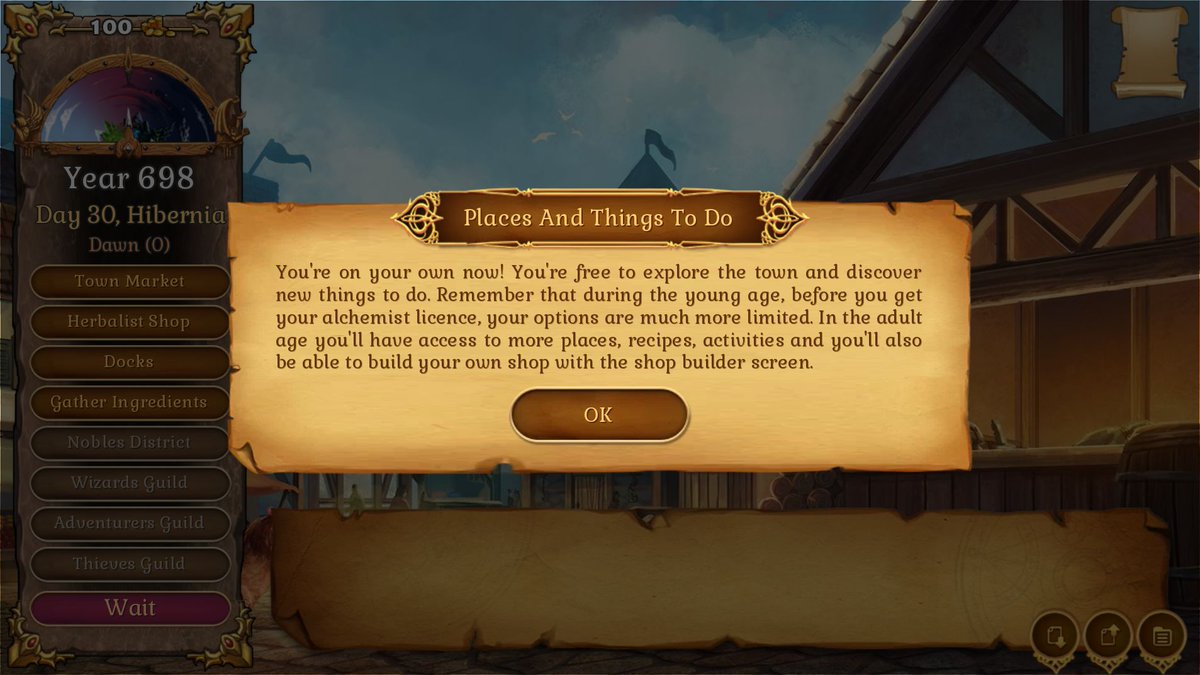
And the tutorial part is done. Now comes the hardest part, code the full simulation gameplay. I'll need to add places to visit, various activities, tasks, random events, etc. Not the biggest part (that was designing all the items/recipes and took me almost 2 months last year!!!) but for sure the most tricky to get "right".
Troyen
Slightly less spoilery version:


"You're on your own now! You're free to explore the town and discover new things to do. Before you get your alchemist's license, your options will be limited. Later on, you'll have access to additional places, recipes, and activities, and you'll even be able to build your own shop!"
jack1974
Haha OK, it's also shorter, so better :) I think by the time that screen appears players will have already enough of reading tutorial texts!
BobTheMob
Now comes the hardest part, code the full simulation gameplay. I'll need to add places to visit, various activities, tasks, random events, etc. Not the biggest part (that was designing all the items/recipes and took me almost 2 months last year!!!) but for sure the most tricky to get "right".


Sooooooo... About how long will that take, Jack?


I know I sound impatient and sincerely apologize for such; it's just that this being apparently so close to ready has me so. Damn. HYPED!!!! :yahoo: :mrgreen: :yahoo:
jack1974
I'll have a better idea next week, I am honestly not sure. This is one of those tasks that you cannot really say "will take XYZ days/hours". I have no idea at all. That's why I decided to stop announcing games in public, in many cases it's impossible to know how long a task will take, if it's something new like this :)